


ClickSWITCH
Switching your direct deposits is easy

Switching to Plumas Bank just got simple. With ClickSWITCH, you can safely move your direct deposits, automatic payments, and subscriptions in minutes from your previous bank or credit union.
No paperwork, no stress—just a quick online process. In just a few clicks, everything is updated. ClickSWITCH helps ensure your money arrives exactly how, when, and where you need it.
FEATURES
- Easily move your direct deposits—like payroll, Social Security, or investment accounts—to Plumas Bank with ClickSWITCH.
- You can also transfer your recurring payments, including mobile phone bills, utilities, streaming services, and more.
- Everything is handled through a quick, seamless process. ClickSWITCH takes care of notifying your employer or provider so your deposits land right where you want them.
- It’s a simple way to bring all your finances together in one convenient place.
HOW TO SWITCH
STEP 1: LOGIN TO ONLINE BANKING
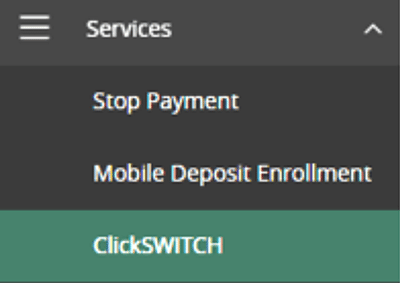
ClickSWITCH easily moves your direct deposit from your previous bank or credit union to Plumas Bank. Access ClickSWITCH within our online banking and the mobile app by choosing the Services menu.
Once you are inside your ClickSWITCH dashboard you can choose to switch direct deposits, switch recurring payments, or view existing switches you have set up.
STEP 2: SEARCH FOR YOUR EMPLOYER OR OTHER DEPOSIT SOURCE
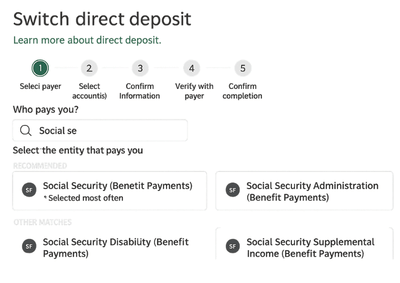
After selecting “Switch Direct Deposits,” simply begin typing the name of your employer, government agency, or other deposit source. Then choose the correct option from the list—look for a verified result with a check mark when available.
STEP 3: ANSWER A COUPLE QUESTIONS
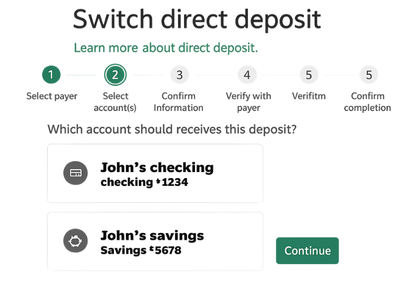
You’ll be guided through a few simple questions—such as selecting the Plumas Bank account for your deposit and entering the last four digits of your Social Security number. Be sure to double-check your details and make any changes before moving ahead.
STEP 4: SUBMIT THE SWITCH
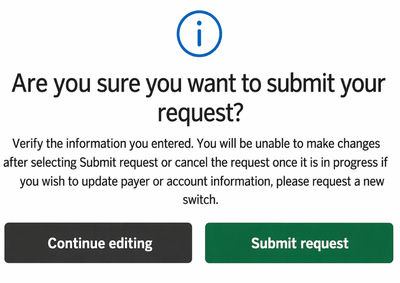
Go ahead and submit your switch—it only takes about 90 seconds. We’ll process and send it within 24 hours.
After that, most automatic payments and direct deposits are updated within 5–15 business days once the company receives your request.
Frequently Asked Questions
-
What is ClickSWITCH?
ClickSWITCH takes the stress out of updating your account information with all your billers and deposit providers.
Just enter your payment and direct deposit details into the secure system, submit your switch, and we’ll handle everything else. You can easily check on your progress anytime by selecting “View Existing Switches” from your dashboard.
With Switch Assist, you can also sign in to your previous bank or credit union to review your transaction history—making it even easier to set up your direct deposits and recurring payments.
-
When can I start a switch?
Anytime you’re ready. Use ClickSWITCH whenever you want to move your direct deposits or recurring payments to Plumas Bank. It’s completely on your schedule.
-
What items can ClickSWITCH move for me?
Use ClickSWITCH to bring your direct deposits—like your paycheck, Social Security, or other income—over to Plumas Bank in just a few steps.
It’s just as simple to move your recurring payments, so everything comes from your Plumas Bank account in one place.
-
How long does the account switching process take?
Getting started takes just about 90 seconds, and your request is sent out within 24 hours.
From there, updates to your direct deposits and payments usually take 5–15 business days, depending on the provider. For peace of mind, you can track each switch anytime on your status page and monitor your accounts as everything updates.
-
What do I need to start my switch?
To get started, gather your direct deposit and automatic payment details. A recent account statement is a helpful place to find everything linked to your account.
If you’re planning to move recurring payments with ClickSWITCH, have the details for any services or subscriptions you’d like to switch ready to go.
-
Additional ClickSWITCH Frequently Asked Questions
What information is stored within ClickSWITCH?
ClickSWITCH only collects the information needed to complete your switch, keeping things simple and secure. This typically includes details you’d find on a check—like your name, address, account and routing numbers—along with your phone number and email.What is a direct deposit and automatic payment?
A direct deposit is any payment sent straight into your account from an organization. This can include your paycheck, government benefits like Social Security or Disability, or even dividend payments from investment accounts.An automatic payment is a recurring bill that’s set up outside of your bank account, like a monthly insurance premium, utility bill, or car loan payment.
How do I know if my payment or deposit has been switched?
The easiest way to check your switch status is by viewing the “Status” column in your ClickSWITCH dashboard within Plumas Bank online banking.When a switch is completed and confirmed, you’ll see it marked as “Completed.” If it’s still in progress, it will show as “Mailed.” If a switch has stayed in “Mailed” status for 15 days or more, it’s a good idea to follow up with the company or check your account to confirm everything is set.
What if I sent the wrong information to ClickSWITCH?
Most of the time, if a switch isn’t successful, ClickSWITCH will send you an email explaining what happened and what steps to take next.
For Federal Government switches, like Social Security, it works a little differently—if there’s an issue, Plumas Bank will be notified and we’ll reach out to help you complete the process.Is ClickSWITCH secure?
Absolutely. Your information is protected with the latest online encryption technology when using ClickSWITCH. Plus, both ClickSWITCH and Plumas Bank maintain high security standards to safeguard your personal data.What if my switch isn’t completed and I miss a payment?
Keeping an eye on your switch status is an important part of the process. It’s a good idea to leave enough funds in your old account to cover payments until each one shows as “Completed” or you’ve confirmed with your billers that your new account information has been updated. -
Who do I contact if I need help setting up my switches or if I have questions?
Please contact us at customerservice@plumasbank.com or call us at 888.375.8627 for assistance.
You are leaving Plumas Bank.
The website you are about to visit is not operated by Plumas Bank. Plumas Bank is not responsible for the availability or content of this website. The privacy and security policies of the site may differ from those practiced by Plumas Bank.
Selecting "Continue" will open a new browser window.