


Card Controls
Debit Card Security and Convenience
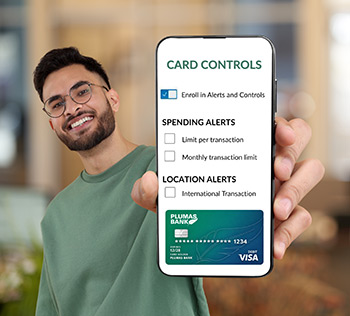
Card Controls enables Plumas Bank online banking clients to securely manage their debit cards through online and mobile banking.
- Customize your card controls and receive alerts for spending, transaction types, and usage locations
- Temporarily disable your card in seconds — and turn it back on just as easily
- Quickly report a lost or stolen card, or flag suspicious activity
- Share your travel plans so your card works smoothly while you’re away
- Request a new card if yours gets damaged
- Easily set up or change your PIN anytime
How to Enroll
- Navigate to Card Controls within online banking or mobile app
- Enroll your card(s)
- Once enrolled, set up alerts, manage your debit card and more.
Frequently Asked Questions
-
What Are Card Controls?
Card controls let you decide how your debit card can be used. You can:- Set a per‑transaction limit so purchases over that amount are automatically declined
- Choose to decline certain types of transactions, like online (eCommerce) purchases
- Decline transactions from specific merchant categories, such as gas stations
Please note: Plumas Bank doesn’t have control over how merchants process transactions and can’t guarantee that every transaction will be declined based on the controls you set.
-
What Types of Transactions Can I Control?
- Online – Online bill payment, online shopping and other card purchases paid for via Internet.
- Mail/Phone Order – Catalog shopping, travel agents payments and other card purchases paid for via telephone, fax, mail, or Internet.
- ATM – Cash dispensers, cash kiosks, and ATMs from which cardholders can withdraw cash.
- In-store Transaction – Department stores, pharmacies, and other card purchases signed for by the cardholder.
- Other – Other cases where transaction types cannot be identified are under this type.
-
What Types of Merchants Can I Control?
- Department Store – Clothing & accessories, office supplies, florists, automobile dealers, home improvement services and equipment, art and sports supplies, and direct marketing.
- Entertainment – Amusement parks, movie theatres, books, music, games, digital entertainment, sports arenas including golf courses, athletic events, aquariums, video rentals, and dance halls.
- Gas Station – Fuel dispenser, warehouse club gas, and petroleum and petroleum products.
- Grocery – Supermarkets, bakeries, meat freezers, candy and other confectionaries, dairy products, specialty markets, and convenience stores.
- Household – Utility services, contracted services, business services, courier services, home improvement services, household appliance stores, money send and stored value cards, and saving bonds.
- Personal Care – Drug stores, pharmacies, health professional services, medical services and labs, ambulance services, legal services, and attorneys.
- Restaurant – Diners, fast-food restaurants, and caterers.
- Travel – Airlines, cars and automotive rentals, hotels, motels, inns, resorts, toll and bridge fees, taxicabs and limousines, timeshares, parking lots, and garages.
- Age Restricted – Liquor & cigar stores, casinos, betting, bars, taverns, nightclubs, dating and escort services, lottery, and gambling.
- Other – Other cases where merchant types cannot be identified are under this type.
Examples include bail bonds, UPS, direct marketing services and products, door-to-door sale, etc.
-
What Are Alerts?
Alerts are sent by text message and let you know whenever a transaction happens on your debit card.
You can set alerts for things like:
- Spending and international purchases
- Different transaction types, such as online, recurring payments, or ATM activity
- Specific merchant types, like gas stations
-
How will I receive notifications?
- SMS messages will come from the short code 86434.
-
Can I Temporarily Disable/Block My Card?
Yes! Just tap/click the toggle next to Enable/Disable Card to turn your card off. This stops any new transactions from being approved. When it’s disabled, you’ll see the card marked as “DISABLED.”
When you’re ready to use your card again, simply tap the same toggle to turn it back on.
-
How do I get a new card if I have reported it as lost, stolen, or fraud?
Log in to online banking or the mobile app. In the Card Controls section, choose the card you want to replace and select Order Replacement. Your new card will be sent to the address shown on the confirmation page and should arrive within 7–10 business days.
You are leaving Plumas Bank.
The website you are about to visit is not operated by Plumas Bank. Plumas Bank is not responsible for the availability or content of this website. The privacy and security policies of the site may differ from those practiced by Plumas Bank.
Selecting "Continue" will open a new browser window.